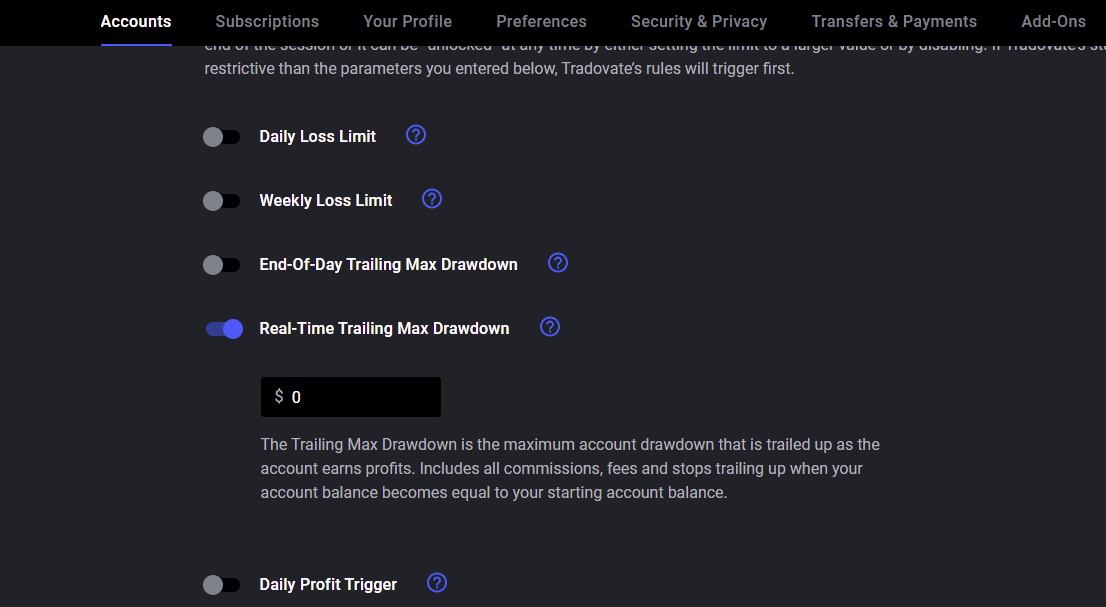
A Trailing Max Drawdown is the maximum amount of loss that your account can sustain, but it ‘trails’ up, meaning as you accrue profits the Trailing Max Drawdown increases. The Trailing Max Drawdown will stop increasing when your account balance becomes equal to your starting account balance.
Look at the figure below to see how the Trailing Max Drawdown works with a starting balance of $100,000 and a Trailing Max Drawdown of $3,000 (with hypothetical profits and losses).
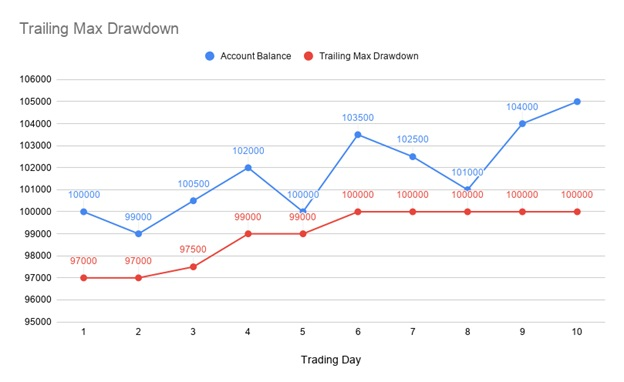
The Trader Application offers two types of Trailing Max Drawdown - End-Of-Day and Real-Time. End-Of-Day Trailing Max Drawdown is calculated at the end of each daily session, while Real-Time is calculated immediately in real time.
To set a Trailing Max Drawdown on your account, go to Application Settings.

Then navigate to the Accounts tab and click on Risk Settings.
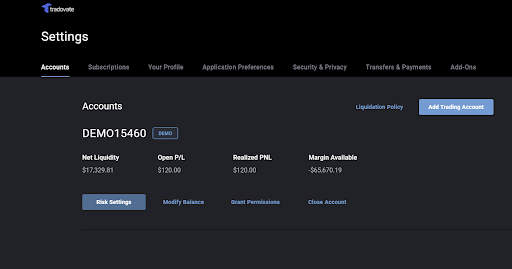
This will expand a detail section that allows you to change your risk settings, including setting a Real-Time or End-Of-Day Trailing Max Drawdown. Enable the toggle for Trailing Max Drawdown and enter a value. Once you are satisfied with your choice you may press Save.